


Rosie-Fancy AI Chatbot
4.5699.00 Reviews
App Specs
- Version
- 1.0.7
- Updated On
- License
- Free
- Downloads
- 500,000+
- Developer
- BLACK ENERGY GROUP
- Categories
- Entertainment
- Platform
- Android
Screenshots
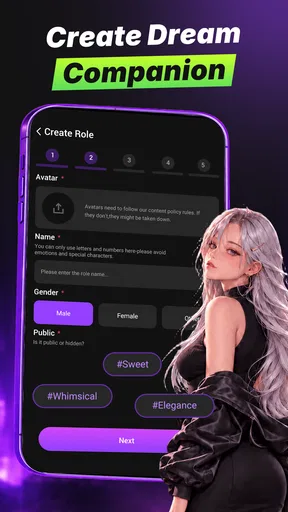



 Analysis by AppCompare
I approached Rosie-Fancy AI Chatbot as something that might sit on a household phone rather than as a private productivity tool. That distinction matters. It is an entertainment app built around fun, flirty, and imaginative conversations, so its appeal depends less on completing a task and more on how comfortable you are spending time with an AI character. In my experience, the most useful way to judge it is to ask where it fits in a shared-device routine, who should have access to it, and whether its conversational style matches the people using the phone.
The app comes from BLACK ENERGY GROUP and is available free of charge, with optional purchases shown from $3.49 to $99.99 per item. It has reached over 500 thousand installs and holds a 4.5 average from around 10 thousand ratings, which suggests that the basic idea has found an audience. Those figures tell me that Rosie-Fancy is not an obscure experiment, but they do not replace a more practical question: will the conversations feel enjoyable enough to justify keeping a mature entertainment app on your device?
How Rosie-Fancy fits into a shared household
When I think about Rosie-Fancy in a shared household, I focus on the small choices that keep a personal chat from becoming everyone’s business. I’d agree in advance who may open it and whether the phone should be put away between users, rather than relying on awkward explanations after someone sees a conversation. That practical boundary leads to the broader question of how age suitability and everyday household routines should shape its use.
A realistic evening with a shared phone
Imagine a household where one Android phone is passed between adults during the evening. One person might open Rosie-Fancy after work for playful conversation, then leave the phone on a table before another family member picks it up. That scenario exposes the app’s main household issue immediately: the experience is personal, but the device may not be. A chat that feels harmless to one adult can be awkward or inappropriate for another person to read without context.
I would treat the app as an individual entertainment space, even if the phone itself is shared. I would not hand it to a child for casual browsing, and I would avoid leaving an active conversation visible when other people may use the device. The mature 17+ content rating is an important boundary, not a decorative label. Rosie-Fancy is better suited to an adult’s clearly separated use than to a communal family tablet or a phone that children regularly borrow.
That does not make it unsuitable for every household. Couples or adult roommates may enjoy comparing creative prompts or discussing the kinds of fictional conversations they find amusing. The key is consent and context. I would not assume that everyone sharing a device wants to see the same style of chat, and I would not treat a shared screen as permission to read another person’s conversations.
What the app is actually good at
Rosie-Fancy works best when I approach it as a low-pressure conversational diversion. I can use a playful opening, ask for an imaginative scenario, or steer the exchange toward a flirtatious mood. That makes it more immediate than a conventional entertainment app that asks me to choose a film, start a game, or browse a large catalog before anything happens.
Worth Reading Before You Choose

EA SPORTS FC Mobile 26 Is a Bigger Football Game, but It Takes Time

Flipboard Shows What News Apps Must Do Beyond the Feed

Switching to Android Auto Means Rethinking Your Driving Routine

Google Calendar Makes a Crowded Week Easier to Manage

Ludo King Makes the Most of the Minutes Between Plans

Baby Panda World Brings Quick Play to Modern Phones, but Its Game Library Feels Busy
The strongest use case is a short session when I want interaction rather than passive scrolling. I can test a silly idea, continue a fictional setup, or simply see how the chatbot responds to a particular tone. It is also a reasonable option for someone curious about AI companions but not looking for a serious assistant that manages calendars, files, or work tasks.
Still, I would keep expectations realistic. The app’s purpose is conversation and amusement, not human friendship, therapy, relationship advice, or dependable factual research. A chatbot can maintain a pleasant tone while still misunderstanding what I mean, losing the thread, or producing a reply that feels repetitive. The enjoyment comes from guiding the exchange, not from expecting the app to understand me exactly as a close friend would.
Three ways to get more from a short session
My first practical tip is to give the conversation a clear frame instead of typing only “hello.” A setting, mood, and limit produce a more focused exchange. For example, I might ask for a playful travel-planning role-play, a fictional mystery opening, or a light conversation that avoids personal subjects. This gives the chatbot something to work with and makes it easier to stop when the session has run its course.
Second, I would use deliberate resets when the tone drifts. If a conversation becomes repetitive or moves somewhere I do not want, a concise instruction such as “change the subject and keep it light” is more useful than continuing to react to every unwanted reply. This is a small but important difference between browsing an AI chatbot and chatting with a person: I can actively define the boundaries of the exchange.
Third, I would avoid treating the chat history as a shared household notebook. Do not use it for family plans, private confessions, passwords, financial details, or information about someone else. Even when an app feels conversational, it is still a digital service, and a shared phone creates an additional privacy risk. For household use, the safest workflow is to keep personal chats separate from communal notes and coordination.
Boundaries, age context, and everyday coordination
For me, the mature age context matters most when a device moves between adults and younger family members, while coordination matters when people expect a chatbot to serve as a source of household information. I’d keep purchases and access decisions with the responsible adult, and use a calendar or family message thread for plans that need to be accurate and easy to retrieve. Those habits help set sensible limits without mistaking entertainment for a household tool.
Setting up the app with the right expectations
The current release is version 1.0.7, and the app supports devices running Android 7.0 or newer. That makes it accessible to many older Android phones, which is useful in a household where not everyone has a recent device. Compatibility alone should not decide whether it belongs on a shared phone, though. The mature rating should be discussed before installation, especially if the device is also used by teenagers or children.
I would begin by deciding whose account or app space the conversations belong to. If the phone is personal, that boundary is straightforward. If several adults use it, I would agree that each person should avoid opening another person’s chat and should close the app when finished. Rosie-Fancy should not become an informal communal account where everyone assumes they can browse everything simply because the device is nearby.
I would also review the purchase path before allowing anyone else to use the app. The free entry point is helpful for trying the basic experience, but optional items can range from a few dollars to nearly a hundred dollars per item. That wide range makes accidental tapping a real household concern, particularly when a payment method is attached to the device. I would keep purchases under the device owner’s control and make sure younger users cannot treat the free download as unlimited permission to buy extras.
Why coordination is separate from conversation
One mistake I would avoid is using Rosie-Fancy as the household’s coordination center. It may be entertaining to ask for a playful reminder or an imaginative version of a family plan, but a chatbot conversation is not a substitute for a shared calendar, a messaging group, or a written shopping list. Those tools are designed for clear ownership and reliable retrieval. Rosie-Fancy is designed for an engaging exchange.
For example, if two adults are arranging a grocery run, I would keep the actual list in a normal notes or messaging app and use Rosie-Fancy only as a light diversion afterward. If a teenager needs to know when a parent will be home, the answer should come from the parent or an established household channel, not from an AI character. This separation prevents amusing conversation from being mistaken for a dependable source of family information.
There is still a modest coordination benefit in agreeing on how the app is used. A household can decide that only adults open it, that the phone owner handles purchases, and that no one reads another person’s chat without permission. Those are behavioral boundaries rather than app features, but they make a bigger difference than trying to force an entertainment chatbot into a role it was not built to fill.
Trust, privacy habits, and emotional distance
My trust in Rosie-Fancy would be limited but comfortable for casual, non-sensitive entertainment. I can enjoy a fictional exchange without assuming that the chatbot has human intentions or personal loyalty. That emotional distance is especially important for younger or lonely users who may interpret a warm, responsive style as proof of a real relationship.
I would encourage adults to explain the difference between simulated attention and human care. The app can respond in a way that feels personal, but it does not replace a friend, partner, parent, counselor, or emergency contact. If someone is using it to avoid every real conversation or to seek help with serious distress, I would recommend stepping away from the chatbot and speaking with a trusted person or qualified professional instead.
For shared devices, I would also avoid entering identifying details about relatives, coworkers, or friends. Do not paste private messages into a role-play, and do not use someone else’s personal story as entertainment without permission. These habits preserve trust inside the household and keep the app in its proper lane: imaginative conversation for the person choosing to use it.
Who should choose it, and who should skip it?
I think Rosie-Fancy is a good match for an adult who wants quick, character-driven AI conversation and is comfortable guiding the tone. It suits someone who enjoys experimenting with prompts, playful scenarios, and flirtatious dialogue without expecting a structured game, a serious assistant, or a human-quality relationship. The free starting point makes it easy to decide whether the style works before spending anything.
I would skip it if I wanted a dependable information tool, a family organizer, a children’s entertainment app, or a private space on a phone that everyone in the home can freely inspect. I would also look elsewhere if I disliked conversations that can feel artificial, repetitive, or emotionally suggestive. A standard messaging app is better for real people, a calendar is better for coordination, and a conventional game or streaming service may be better when I want clearly defined entertainment rather than open-ended dialogue.
The mature rating also narrows its audience. It is not an app I would recommend as a general family download, even if adults and children share the same device. A household can technically separate usage through its own routines, but I would prefer a genuinely age-appropriate app when a child is likely to encounter the device unsupervised.
My household verdict
After considering Rosie-Fancy in a shared-device setting, I see it as a focused adult entertainment app rather than a household utility. Its appeal is the speed with which it turns a prompt into a playful exchange, and its best sessions come from giving the conversation a clear mood and purpose. The free access lowers the barrier to trying it, while the optional purchases mean I would keep payment controls firmly with the device owner.
The main limitation is not that it lacks a family dashboard or a coordination system; it is that those are not the reasons to install it. I would not expect it to manage boundaries for a household, protect a child from mature material, or keep family plans organized. Those responsibilities belong to the adults using the device and to tools designed for those jobs.
BLACK ENERGY GROUP has positioned this app for imaginative, flirty chat, and that narrow focus is exactly why it can be enjoyable when used deliberately. I would install it on a personal adult phone, try a few carefully framed conversations, and decide whether the responses stay engaging enough to return to. On a shared device, I would use it only with clear age, privacy, and purchase boundaries. My recommendation is positive for adults seeking casual AI companionship, but conditional for any household where the phone regularly changes hands.
Pros
- Quick
- natural-feeling replies for casual conversations
- Useful for brainstorming
- writing prompts
- and everyday questions
- Simple interface makes starting a chat easy
- Offers a playful alternative to traditional assistant apps
- Conversation history helps revisit previous exchanges
Cons
- Some responses may feel repetitive during longer conversations
- Answer accuracy can vary with complex or specialized questions
- Certain features may require a subscription or in-app purchases
- Privacy details should be reviewed before sharing personal information
- Requires an internet connection for most chatbot interactions
FAQs for Rosie-Fancy AI Chatbot
What is Rosie-Fancy AI Chatbot and what can it do?
Rosie-Fancy AI Chatbot is an AI-powered conversation app designed for casual chats, questions, brainstorming, entertainment, and general assistance. During testing, its main appeal was the ability to start a conversation quickly without complicated setup. It can generate replies, help develop ideas, and respond to different topics, although the quality may vary depending on the question, conversation context, and available app features.
Is Rosie-Fancy AI Chatbot free to download and use?
The app may be available to download at no initial cost, but some functions can depend on subscriptions, credits, advertisements, or in-app purchases. Before using it extensively, check the pricing information shown on the official Google Play Store or Apple App Store listing. Pay particular attention to trial periods, renewal terms, and which chatbot features are restricted to premium users.
Does Rosie-Fancy AI Chatbot require an internet connection?
Yes, users should generally expect to need an active internet connection because chatbot conversations are usually processed through online servers. The app may not provide a complete offline mode, and responses can be delayed or unavailable when the connection is weak. Mobile data usage is also worth considering, especially if you use the chatbot frequently or exchange long messages.
Is Rosie-Fancy AI Chatbot safe and private to use?
As with any AI chat application, avoid entering passwords, financial details, private documents, precise personal information, or anything you would not want processed by an online service. Review the app’s privacy policy and requested permissions before creating an account. AI responses should also be checked carefully, since the chatbot can produce inaccurate, unsuitable, or misleading information.
Who should download Rosie-Fancy AI Chatbot?
Rosie-Fancy AI Chatbot may suit users who want an accessible tool for casual conversation, creative prompts, quick explanations, entertainment, or help organizing ideas. It should not be treated as a replacement for professional medical, legal, financial, educational, or emotional support. Parents should also review the app’s age rating and content before allowing children or teenagers to use it.


